Surfin’ Safari

Optimizing Page Loading in the Web Browser

Posted by Antti Koivisto on Sunday, March 23rd, 2008 at 5:27 pm

It is well understood that page loading speed in a web browser is limited by the available connection bandwidth. However, it turns out bandwidth is not the only limiting factor and in many cases it is not even the most important one.
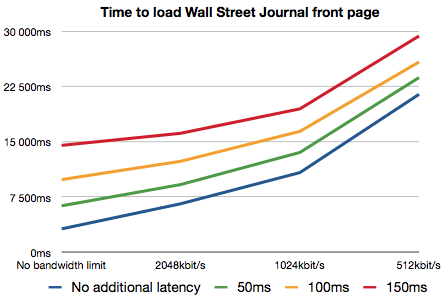
The graph above shows the time it took to fully load the Wall Street Journal front page (chosen for its complexity which well represents many modern web sites) with a recent WebKit. Browser caches were cleared before each page load. The Mac OS X dummynet facility was used to simulate various network conditions by introducing packet latency and capping the available bandwidth. Since the testing was done against a live web site the actual connection latency was a factor as well (ping time to wsj.com was ~75ms).

From the figure it is clear that while available bandwidth is a significant factor, so is the connection latency. Introducing just 50ms of additional latency doubled the page loading time in the high bandwidth case (from ~3200ms to ~6300ms).

Latency is a significant real world problem. Wireless networking technologies often have inherently high latencies. Packet loss and retransmits due to interference makes the situation worse. Geographical distance introduces latency. Just the roundtrip delay between US East and West Coast is somewhere around 70ms. Loaded web servers may not respond immediately.

Why does latency have such a huge impact on page loading speed? After all, to load a page completely a web browser just needs to fetch the page source and all the associated resources. The browser makes multiple connections to servers and tries to load as many resources in parallel as possible. Why would it matter much if it takes slightly longer to start loading an individual resource? Other resources should be loading during that time and the available bandwidth should still get fully utilized.

It turns out that figuring out “all the associated resources” is the hard part of the problem. The browser does not know what resources it should load until it has completely parsed the document. When the browser first receives the HTML text of the document it feeds it to the parser. The parser builds a DOM tree out of the document. When the browser sees an element like <img> that references an external resource, it requests that resources from the network.

Problems start when a document contains references to external scripts. Any script can call document.write(). Parsing can’t proceed before the script is fully loaded and executed and any document.write() output has been inserted into the document text. Since parsing is not proceeding while the script is being loaded no further requests for other resources are made either. This quickly leads to a situation where the script is the only resource loading and connection parallelism does not get exploited at all. A series of script tags essentially loads serially, hugely amplifying the effect of latency.

The situation is made worse by scripts that load additional resources. Since those resources are not known before the script is executed it is critical to load scripts as quickly as possible. The worst case is a script that load more scripts (by using document.write() to write <script> tags), a common pattern in Javascript frameworks and ad scripts.
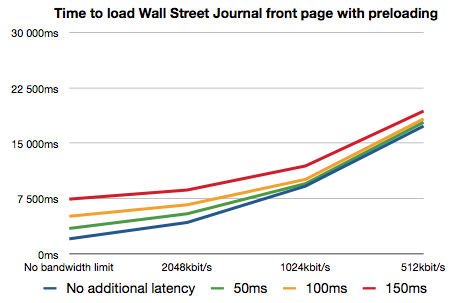
The latest WebKit nightlies contain some new optimizations to reduce the impact of network latency. When script loading halts the main parser, we start up a side parser that goes through the rest of the HTML source to find more resources to load. We also prioritize resources so that scripts and stylesheets load before images. The overall effect is that we are now able to load more resources in parallel with scripts, including other scripts.
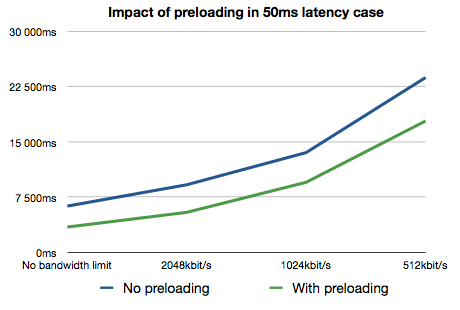
You can see from the graphs above that these optimizations significantly reduce the impact of network latency and generally improve page loading speed. For example with 50ms of simulated latency and no bandwidth limit, the overall page loading time was 2.8s faster (6.3s to 3.5s). With bandwidth capped to 512kbit/s the improvement was 5.9s (23.8s to 17.9s).

20 Responses to “Optimizing Page Loading in the Web Browser”

  1. twelvelabs Says:

    I read recently that webkit doesn’t support the script element’s defer attribute. Wouldn’t that help as well?

  2. Dave Hyatt Says:

    It would, except that Web sites rarely use it, so you can’t really depend on it.

  3. Maciej Stachowiak Says:

    That being said, we also hope to support <script defer> at some point.

  4. Antti Koivisto Says:

    Defer is bit of a cop out since the problem is largely solvable in the browser side without shifting the burden to the web authors.

  5. mbelshe Says:

    This is awesome work, Antti.

    What’s your take on the issue of script that is conditionally loaded based on cookies?

    e.g.
    // this javascript sets a cookie via SetCookie which affects the js2.js code

    With this patch, I believe the js2.js could be loaded before the cookie gets set.

    IE8 has the same behavior. It may not be a problem in practice, and personally, I think the gains outweigh the potential problem. But I wonder what your thoughts are? I suppose you could reload js2 if you detect a cookie change.

  6. Antti Koivisto Says:

    Yeah, we’ll need to see if that turns out to be a problem in practice. It would be pretty strange for the server side to rely on having particular cookies on subresources and I haven’t run any such cases. It seems to me that browser resource caching would make such setup pretty unreliable anyway. The script execution order is no affected so js2.js execution will still see the cookies set up by the first js correctly.

    If it turns out to cause problems, like you say, there are potential solutions like reloading the preloaded resources on cookie change.

  7. znerd Says:

    Does WebKit also plan to support the HTML 5 prefetch link-tag?

    While the discussed technique potentially optimizes all web pages, a prefetch link-tag requires web authors, or the frameworks/tools they employ, to do some analysis up-front. But the performance gains can be even bigger, as required resources can be fetched as soon as the head section of the HTML document is parsed, or perhaps even as soon as the link tag is parsed.

    See the HTML 5 draft, at:
    http://www.whatwg.org/specs/web-apps/current-work/#link-type12

  8. wmertens Says:

    We have some ajax-heavy internal websites, and they load significantly faster. The important data is also available much sooner.

    This is simply a stunning speed improvement. Thank you ever so much!

  9. achille Says:

    There’s a major usability bug during page loading that has yet to be fixed. When clicking a link (especially a slow one) the browser will context switch and start loading the new page — but it will not always refresh the screen. So the first page is still displayed. It’s not possible to click any of the links. If one of the tabs is in the same situation (safari trying to make a network connection) switching to that tab does not erase the contents of the previous tabs.

    While that might not seem to be a problem (escpecially in the US) in other countries it’s a problem.

    Is there a bug open for this?

  10. Aisys Says:

    I wonder if someone on the team could comment on a (somewhat) related issue, involving page load performance and caching headers, in particular with images. Numerous bug reports have been filed on these issues, but they don’t seem to be getting any attention: 17998, 7414, 13128, 13892, 16892….

  11. Antti Koivisto Says:

    We are definitely going to look into other aspects of the loading performance as well.

  12. Aisys Says:

    Thanks great. I would think that all these approaches especially benefit the iPhone.

  13. Abhi Beckert Says:

    This is really cool. The homepage of a website I’m working on now is much “snappier” with the current nightly.

    Looking at the network inspector, there is only a slight improvement in actual load time (0.3 seconds or so, it fluctuates), but the javascript and css files are loading much earlier. More importantly, the page is drawing to the screen almost 2 seconds faster in the nightly build than in Safari 3.1 (just over 2 seconds for nightly, just over 4 seconds for Safari 3.1).

    Good work guys!

  14. Antti Koivisto Says:

    Yeah. Earlier first display can be one of the side benefits even in cases where the overall load time does not really improve much.

  15. Nicholas Shanks Says:

    My current apartment in Munich has a rather crummy wireless internet router upstairs which the landlady frequently turns off while I’m using it, and I am living in a downstairs apartment, behind a few walls, a window and the staircase. In order to download anything at more than 0.3 KB/s I have to hold my laptop above my head at a 45° angle while sitting on the sofa with the window behind me. Got that?

    Okay, so the problem arises when my arms get tired. I bring the laptop down to my lap, and find Safari showing a blank white page, while the status bar says “loading news.com; completed 22 of 105, 16 errors encountered” in the status bar. I sigh, wait a few seconds, hit reload and lift up the computer again.

    What I would *really* like is if WebKit would just show me whatever it has downloaded already, instead of a white page. I don’t care about FOUC if that ‘flash’ lasts 3 minutes. At least I get to read something in that time. Often the laptop simply loses the wireless connection completely, in the middle of a page load, and WebKit just sits there dumbly waiting for data that’s never going to arrive. Can dumynet simulate this too?

  16. Dave Hyatt Says:

    We should definitely give up and display what we’ve gotten after a certain amount of time (15-20 seconds).

  17. Antti Koivisto Says:

    We should also consider doing that when the stop button is hit in the middle of the loading.

  18. mortennorby Says:

    I have a 3Com OfficeConnect wireless ADSL router, which somehow doesn’t play well with Safari/Webkit when it comes to ads that use document.write(” “) to create the ad.

    What happens is that rendering stops, and in the Actiivty window some js file from an ad network is listed as “0 bytes of ?”. If I double click the line in the Activity window, a new window opens with the (seemingly) complete contents of the file, but the original entry in the Activity window remains at “0 bytes of ?”, and the original page does not resume rendering.

    Here is an example of a page that shows the problem:

    http://politiken.dk/

    It doesn’t happen on a Netlink router (with Airport as the Wi-fi router) on a different ADSL network.

    This optimization seems to have improved things, but it still happens quite often, so I get the suspicion that there are timing-related reasons for these pages not rendering. Reloading the page a couple of times finally shows it.

    Firefox does not seem to have the problem.

  19. Pascal Lessard Says:

    > We should definitely give up and display what we’ve gotten after a certain amount of time (15-20 seconds).

    If you do, you should also insert a visible element informing the user that the page shown only has partial content. A red strip (or even better, an alternating construction yellow/black strip) at the top of the viewport… Because the “broken document” icon Navigator used to display only applies to unloaded images and many other invisible elements in a page could be missing and render the page dysfunctional (like scripts) where the “broken document” icon would not be visible.

  20. brynt Says:

    I’ll add my thanks to the chorus of them already posted here. I live in South Africa and use an EDGE connection, putting my latency to international sites such as this one somewhere in the 600ms range. These kinds of improvements make a huge difference to the way the web feels, and it’s much appreciated.

    Hopefully this will prompt other browser developers to take latency more seriously as a means of improving performance. So far I’ve only seen Opera do something similar, but Firefox (at least with version 2) would patiently wait for each JS/CSS item before moving on.