Fixing Top-Level Await in Safari
WebKit for Safari 27 adds full spec compliance for top-level await. Before now, some of you may have run into unexpected “accessed before initialization” errors. We fixed it at the root by rewriting Safari’s module loader from the ground up so you can now confidently use await at the top level of your JavaScript modules. If top-level await wasn’t part of your toolkit before, this is a great time to give it another look.
What is top-level await?
Top-level await lets you use await at the top level of a module, enabling the same convenient use of Promises that async functions provide. Async functions provide support for await expressions to simplify complex Promise chains into linear sequences of code, and top-level await allows module authors to benefit from the same ease of use. Effectively, whenever an await expression is encountered, execution is paused until the awaited value is available, and in the meantime, control is returned to the caller of the async function. For ES modules, the analogy differs: when a module encounters a top-level await, any module that imports it is also suspended until the await resolves. However, sibling modules in the dependency graph that don’t depend on the awaiting module can still execute concurrently.
What this means for the web
You can try all of this today. Download Safari Technology Preview 251 or grab Safari 27 beta, and try integrating top-level await into your web apps. It just works! The improvements go beyond just top-level await: with the module loader rebuilt on the right foundation, ES modules as a whole are now something you can build on in Safari without a second thought. And once Safari 27 ships, you’ll be able to lean on top-level await and ES modules across your projects, in production, for everyone.
The problem
Top-level await is a complex feature implemented inside the module loader machinery. The ECMAScript specification’s section of modules leaves some parts up to the host—this includes the mechanism of fetching modules, which in practice will be done over the network by web browsers or from the local filesystem by JavaScript runtimes like Node.js and Bun. The WebKit team wrote Safari’s module loader long ago, back during the days of the WHATWG Loader proposal (last updated January 2016), and we relied on the proposal’s specification of the host-defined functionality. This worked during the early history of ES modules, when module execution was purely synchronous and top-level await didn’t exist. However, ECMAScript 2022 was later released, introducing top-level await as a feature. By this point, the WHATWG Loader proposal had effectively faded into obscurity after being superseded by the ECMAScript standard’s module section, but Safari’s module loader was still based on it. Top-level await was implemented in terms of a proposal that was abandoned before any support for async/await existed in ECMAScript, instead of in accordance with the ECMAScript standard’s algorithms for asynchronous module execution. This mismatch caused subtle bugs that we couldn’t fully resolve for years, despite multiple attempts. Instead of continuing to patch a foundation that couldn’t support the feature, we decided to rebuild it correctly.
An example
A major cause of Safari’s top-level await bugs was in how the module loader chose the order in which to load and evaluate modules. This code example demonstrates the issue:
// main.js

async function load(index) {
    try {
        print("Importing", index);
        const module = await import("./test-module.js");
        print("Imported", index);

        try {
            print(`Keys for ${index}:`, Object.keys(module));
        } catch (e) {
            print("Accessing", index, "failed:", e.message);
        }
    } catch (e) {
        print("Importing", index, "failed:", e.message);
    }
}

try {
    const imports = Array.from({ length: 3 }, (_, i) => {
        return load(i + 1);
    });

    await Promise.all(imports);
} catch (e) {
    print("Test failed:", e);
}
// test-module.js

await new Promise(resolve => setTimeout(resolve, 10));

export function someFunction() {
    return "Hello!";
}

export const someArray = [];
Its purpose is to dynamically load the same module three times in a row, printing the names of the module’s exports each time. It’s supposed to be ordered 1, 2, 3, but if the code is run with the old module loader, something unexpected occurs:
Importing 1
Importing 2
Importing 3
Imported 2
Accessing 2 failed: Cannot access 'someArray' before initialization.
Imported 3
Accessing 3 failed: Cannot access 'someArray' before initialization.
Imported 1
Keys for 1: someArray,someFunction
There are two things going wrong here. First, the order in which the imports complete is wrong. Instead of the expected 1, 2, 3, the order is 2, 3, 1. Second, there are strange errors about accessing a value before it’s initialized. Both problems are caused by the same bug.
When the module loader starts loading the module with top-level await the first time, it begins to execute it, and then pauses execution when it reaches the await. It then returns control to the main module, which begins the second import. The promise for the second import shouldn’t resolve until after the first import is done evaluating, but due to a bug in the old module loader, it resolves immediately. This leads to the second import finishing first, and because the evaluation of the imported module hasn’t completed yet, the code to print the module’s keys accesses uninitialized exports, causing an exception. The same happens with the third import. After those two fail, the first import finishes. This time, the evaluation has completed, so it’s able to successfully print the keys of the module’s exports.
With the new module loader, the output is what you’d expect:
Importing 1
Importing 2
Importing 3
Imported 1
Keys for 1: someArray,someFunction
Imported 2
Keys for 2: someArray,someFunction
Imported 3
Keys for 3: someArray,someFunction
Self-hosted JavaScript builtins vs. native C++
The old module loader was written in JavaScript as a self-hosted builtin. This had some advantages: unlike native code, JavaScript builtins can be inlined into the user code that invokes them, and it’s possible to avoid the performance penalty paid when crossing the boundary between JavaScript and C++. In addition, creation of objects is faster from JavaScript, as it’s sometimes possible to eliminate the heap allocation.
However, we later found multiple drawbacks with self-hosted JavaScript: it’s slower to start up because it has to be compiled at run time, unlike native code, which is fully compiled well in advance. In addition, builtins have inherently wide usage characteristics, which makes it harder for JavaScriptCore’s optimizing JIT compilers to exploit patterns in usage, and the module loader code isn’t a hot path, which further reduces the benefit of compiling at runtime. As a result, overall performance is less stable and predictable than it is for C++. When we rewrote the module loader, we chose to drop the self-hosted builtin approach in favor of fully native code.
The rewrite
In January 2026, we began rewriting the module loader. Because the consensus at that point had been that self-hosted JavaScript was not the ideal approach for the module loader, we started the process by deleting the entire JavaScript file that contained the old module loader.
After that, we began implementing the module loader operations one by one, translating the pseudocode defined in the ECMAScript specification into C++. As a guide through ordering which functions to implement first, given that the module loading machinery is a complex state machine, we read through the specification and took note of how the functions called each other and assembled a flow graph. This gave a starting point.
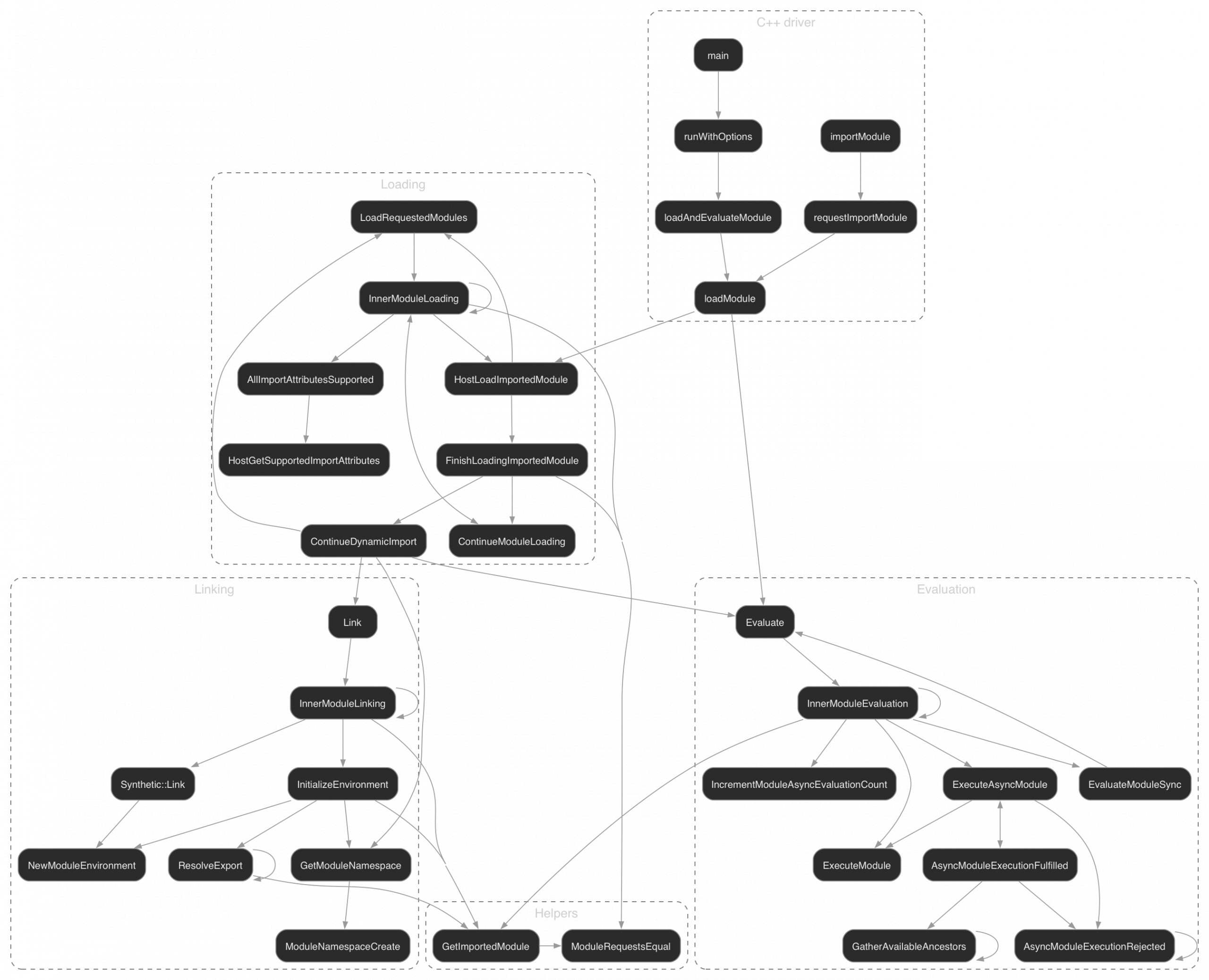
Leaf functions like ExecuteModule and ModuleRequestsEqual were ideal to implement early because they didn’t depend on any other functions. After a few weeks, the new module loader was able to handle the most common cases and a draft pull request was put up.
Testing the rewrite
Because the point of the rewrite was to improve the module loader’s reliability, thorough testing was essential. Engineers at Bun, whose runtime is built on JavaScriptCore and inherited the old module loader’s problems, graciously provided test cases they’d collected that demonstrated incorrect behavior. It was simple to adapt these to run with JavaScriptCore’s command line shell (jsc) and integrate them as tests.
To stress test the module loader’s performance and functionality, we wrote a fuzzer that produced complex graphs of modules (some with top-level await, others without) and import statements. The goal was to ensure that the observable effects of the module loading process were correct. We did this by generating large graphs and comparing the output of JavaScriptCore with the new module loader to the output of other JavaScript engines. If the text output matched byte-for-byte with other engines’ outputs, we could be sure that the new module loader was handling the test case correctly. And indeed we found in every tested example that the new module loader correctly handled the fuzzer output. Once all the module-related tests from test262 started passing and we fixed many previously failing module tests from WPT as well with no regressions, the new module loader was ready for merging. By this point, we had for a few weeks been daily driving a build of Safari with the new module loader integrated with no issues.
Give it a try
When we release Safari 27, you can start shipping web apps that take advantage of top-level await’s benefits. Until then, download the beta and try integrating top-level await into your projects. If you run into any issues, we’d love to hear your feedback. As always, bug reports can be submitted at bugs.webkit.org.