Introducing spatial CSS:
A developer preview
Safari on VisionOS 27.3 comes with an important update: a limited feature preview of the proposed spatial CSS API, with an initial focus on working with 3D objects through the <model> element. While it’s a big conceptual jump, spatial CSS itself is made of a lot of small tweaks to existing syntax. Read on for more details, but here’s a list of each of the features covered in the update:
- Collecting multiple elements inside a
spatial:portal transformto move multiple models independentlyposition-anchorto snap models together@environment-mapsyntax to reuse and manage different lighting,- Enabling orbit over the portal scene with
portal-action:orbit, - Using
requestVolumetricScene()to launch a connected volumetric scene.
To enable the features for yourself on Vision Pro, or to check it out in the visionOS Simulator, go to
Settings > Apps > Safari > Advanced > Feature flags > CSS Portals.
You can experience the spatial CSS demo page here. You can also learn more about installing additional simulators from Xcode here.
The big picture
The 3D <model> element, now available in Safari 27 on all platforms, allows you to present intrinsically 3d objects on their own, in their own space. However, the web is at its best when it allows the composition and configuration of content based on author intentions and user context. These context cues can include the device display capabilities, window size, and color theme. These requirements will remain even as we include spatial content — and ideally, authors should be able to use the same kinds of patterns to build for the spatial web.
And spatial content should not just be designed for spatial devices. The last few years have seen a dramatic rise in the number of websites showing 3D content – on phones, tablets and computers as well as headsets. Spatial web standards should support designing for browsers wherever they run.
New web features, classical CSS
By routing functionality for spatial content through declarative CSS, a page can use media queries targeting aspect ratio, color theme and reduced motion to adapt spatially as well. This adds much more flexibility to your website without having to do as much in your JavaScript, and removing the need to keep track of any complicated state.
Even better, the numerical parameters can be animated and transitioned in the same way that any other value can be changed on the page.
VisionOS 27.3 offers the first components of spatial CSS in a developer preview, and this article demonstrates how to use them through the case study of a simple set of children’s blocks.
Feature breakdown
spatial:portal
The feature that kicks this all off is the declaration that an element is acting as a portal, through the new spatial:portal syntax. Elements that can contain other elements – think <figure>, <div> – can act as a portal, and will then act as a space that all of the child elements nested inside it share. This preview focuses on model elements, but the specification is written so that this approach should work for all content.
spatial transform:
Once the models are collected inside a shared space, you can then move, rotate, and scale them using their standard transform attribute. This takes the same DOMMatrix class that creates 2D and pseudo-3D transforms in other contexts, but can now act as a true 3D transform to objects inside the portal context.
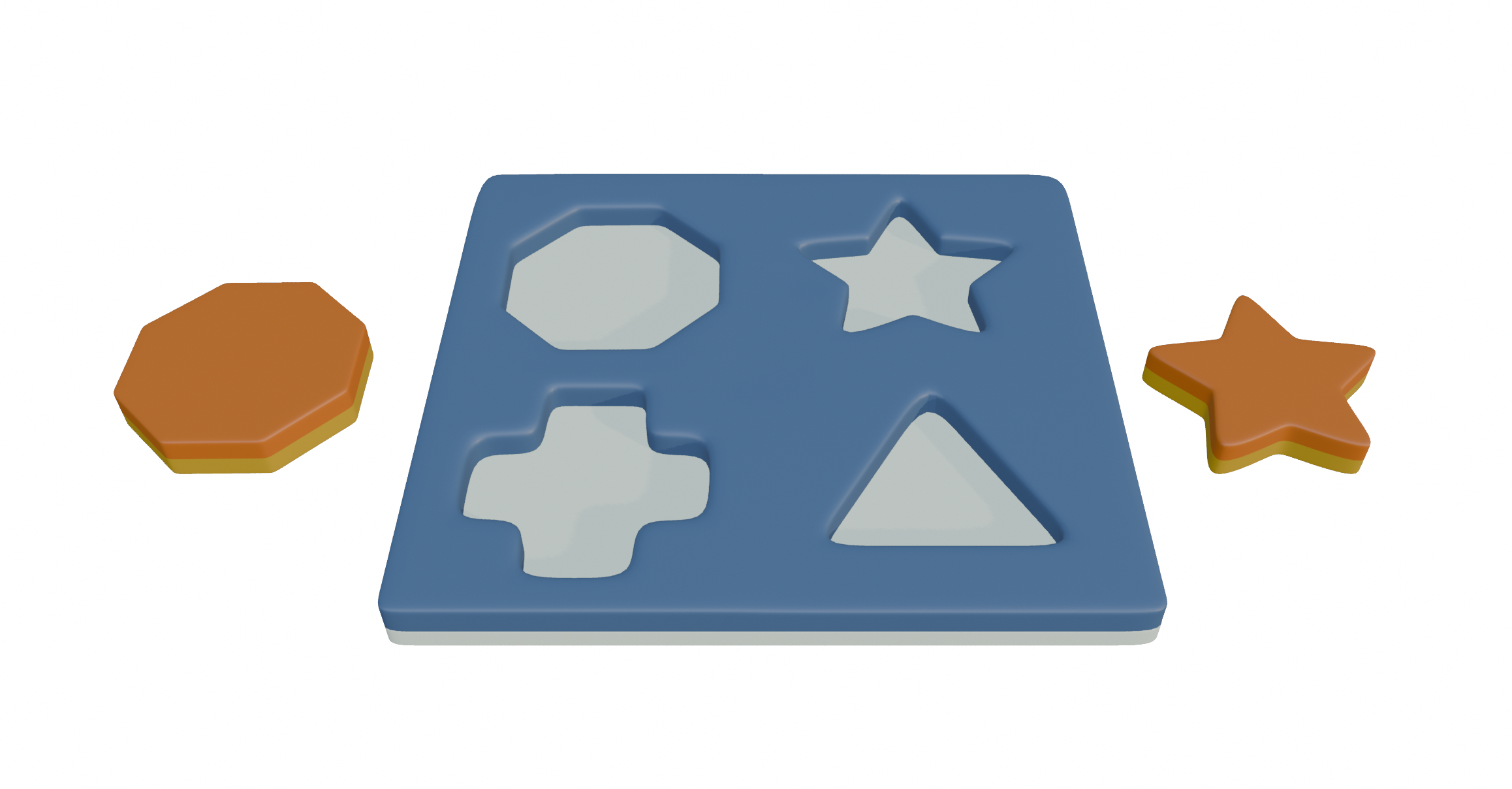
<div class="world" style="spatial:portal;">
  <model id="board" src="board.usdz"></model>
  <model id="octagon" src="octagon.usdz"></model>
  <model id="star" src="star.usdz"></model>
</div>
<style>
    #octagon {
        transform:translateX(-50cm);
    }
    #star {
        transform:translateX(50cm);
    }
</stye>
The code for presenting this scene and setting the blocks off to the sides.
The board and the block objects can be moved and rotated independently — an expanded settings panel shows different values. While a model’s animation timeline could manage single sequence of action, this adds the degrees of freedom required for more sophisticated interaction or configuration.
position-anchor
Fitting 3D objects together can get complicated. We need a way to attach models to specific places on other models — think of putting together pieces of furniture. Model is a void element, which means it means we can’t nest models inside other model elements the same way that other DOM is nested. Instead, we’re borrowing from the CSS concept of position-anchor and adding a way to align and orient objects according to their anchors. position-context: anchor is the way to make it work.
See it in action

<div class="world">
    <model id="board" src="board.usdz"></model>
    <model id="octagon" src="octagon.usdz"></model>
    <model id="star" src="star.usdz"></model>
</div>

<style>
    #board {
        anchor-name:--board;
    }
    #octagon {
        position-anchor:--board#octagon-position;
        position-context:anchor;
    }
    #star {
        display:none;
    }
</style>
The code for using position-anchor to achieve the correct placement for the block.
The board used in the example consists of three separate objects inside the 3D program it was built within: The visible shape of the board itself, and two reference positions — often called “null objects” or “empties” in 3D editors. These correspond to the correct position for each of the shape blocks to slot into when they’re on the board. Here’s the scene and its contents inside Blender:

Rather than copy-pasting values from your 3D editor, or having to guess at the right transform, you can nominate specific anchor points — just like in the 2D equivalent of the feature — to place an object in the right location. These anchor points can be animated, too, making it easier to compose elements even when they’re moving around.
@environment-map
An environment map is the lighting that is reflected off of an object — think of it as the room that an object appears within.
We introduced environment maps as an HTML attribute on the model element, because it was the only element that would be able to use it. Now that there is a broader range of elements that will be able to share environment maps. Taking inspiration from @keyframes for animation, we leverage @environment-map to facilitate this. This preview provides support for 360º HDR images and adds the clarifying syntax to indicate what they are and how to work with them.
See it in action

<div class="world spooky">
    <!--... -->
</div>
@environment-map {
    name: "spooky";
    format: equirectangular;
    src: url("night.hdr");
}

.world.spooky {
     environment-map: "spooky";
}
The code for setting up the spooky environment lighting.
portal-action:orbit
One of the main things that users want to do with 3D content is to look around it by rotating the scene in-place. In 3D programs this is often called an ‘orbit’, and spatial CSS enables it with the new portal-action attribute. It may be useful to add more modes in the future like pan-x or pan-y. This mirrors the model element’s stagemode attribute on the HTML element, but by configuring it in CSS it becomes more flexible.
requestVolumetricScene()
In addition to showing a spatial arrangement inside a portal, visionOS has the ability to show these scenes outside of the browser window in what we’re calling a Connected Volumetric Scene. Launch a request from a user action to remove the spatial content from its portal and present it in the user’s space:
launchSpaceButton.addEventListener("click", event=>{
    const world = document.querySelector(".world");
    world.requestVolumetricScene();
});
The code to launch the volumetric scene.
Users can place the volumetric scene anywhere in their space, and the live link between the web page and the volumetric scene will let you update the scene — add or remove objects, or move them based on your needs.
Your feedback is essential
There is a long journey ahead, and a lot more to get to in the proposed spatial CSS specification. While this feature preview is limited to visionOS, we thought it was important to release along with the full specification as an indication of how to approach bringing spatial concepts to the web. Along with the general release of the <model> element on Safari 27, we hope this gives authors enough to think about the opportunities — and requirements — that lie ahead in the spatial web. That’s also why it’s so important for authors to explore the feature preview and tell us about their experience of using it. You can download the visionOS simulator with Xcode. If you don’t already have Xcode, you can download Xcode from the Mac app store.
To share your thoughts on the Spatial CSS feature preview, find us on Mastodon at @jensimmons@front-end.social, @jondavis@mastodon.social, or on X at @zachernuk. Or send a reply on X to @webkit. You can also follow WebKit on LinkedIn. If you run into any issues, we welcome your feedback about WebKit at bugs.webkit.org. Filing issues really does make a difference. Thanks.