Surfin’ Safari

Ten New Things in WebKit 3

Posted by Maciej Stachowiak on Wednesday, November 14th, 2007 at 8:27 pm

Lately we’ve been talking about a lot of great new features in the latest development trunk of WebKit – features like web fonts, client-side database storage, CSS transforms and CSS animation. These features will likely make it to an official release someday. But I’d like to take a step back and talk about some older features, namely all the great stuff in our recent stable release.

Apple recently released Mac OS X 10.5 “Leopard”, including Safari 3. The latest Safari is also included in Mac OS X 10.4.11, the latest update to Tiger. A corresponding version is available as the latest Safari for Windows Beta, including the new features and lots of stability and usability improvements.

Apple’s site can tell you a lot about the new end-user features of Safari 3. But a lot of the goodness is on the inside, in the WebKit engine that powers Safari. Here’s a list of ten of the most exciting engine enhancements since the Safari 2 version of WebKit, with lots of details and demos. These features are all included in the WebKit that comes with Safari 3 – you don’t have to download nightlies or anything else to get them.

1. Enhanced Rich Text Editing

As you browse the web with a WebKit 3 based browser, you will get a complete and functional rich text editing experience on the new read-write web. Here’s a sweet demo of our improved editing support, just click the text and editing controls appear.

Specifically, we have worked together with developers of RTE libraries and applications to improve compatibility. WebKit 3 fixes many bugs, and supports additional text editing features like links and lists. We now have support from web applications like WordPress, Google Docs, GMail, Blogger, and many more. We’ve also improved editing to support libraries like TinyMCE and FCKeditor. We expect even more web apps and toolkits to add support over time.

2. Faster JavaScript and DOM

We have greatly improved the speed of JavaScript and DOM operations, both critical to the performance of today’s rich web applications. You can see this on a number of benchmarks. To gather the results below, I tested on a MacBook Pro (2 GHz Core Duo, 1 GB RAM). For the WebKit 2 results, I used Safari 2.0.4 on Mac OS X 10.4 Tiger. For the WebKit 3 results, I used Safari 3.0.4 on Mac OS X 10.5 Leopard.

  • i-Bench JavaScript Processing – The primary benchmark that Apple marketing has used is the JavaScript i-Bench. While you can download it yourself, it’s a bit of a pain to set up. Most of the other benchmarks listed below are easier to run yourself, but are not as realistic and comprehensive in their coverage.
    WebKit 2 - 1.99 sec
    WebKit 3 - 0.87 sec
    WebKit 3 is 2.3 times as fast!
  • Celtic Kane Javascript Speed Test 2007 – This popular benchmark is easy to try in the browser and covers a variety of JavaScript and DOM processing tasks.
    WebKit 2 - 1276 ms
    WebKit 3 - 624 ms
    WebKit 3 is 2 times as fast!
  • pentestmonkey MD5 test – This test times various cryptographic checksums coded in pure JavaScript. Run it here.. I’m reporting only the MD5 numbers – the other changes are similar.
    WebKit 2 - 8.352 sec
    WebKit 3 - 3.794 sec
    WebKit 3 is 2.2 times as fast!
  • JavaScript Raytracer – The full mode of this JavaScript Ray Tracer is a test of many parts of the browser including JavaScript, DOM and layout.
    WebKit 2 - 853.594 sec
    WebKit 3 - 48.48 sec
    WebKit 3 is 17.6 times as fast!

If you try other JavaScript and DOM benchmarks on the web, you’ll see similar results – speedups of 2x or more. These are speedups you will really feel on advanced web applications.

3. Faster Page Loading

WebKit 3 also offers significantly improved raw page loading speed. Unfortunately it’s hard to find good benchmarks in this area. The best we know of is the HTML i-Bench which is a pain for the casual user to set up, but which is based on real web content.

Some have argued that page loading benchmarks are unfair because browsers dispatch the load before painting, and Safari will sometimes even do it before the first layout. But the HTML i-Bench is one of the few tests to factor this out – it forces a layout and scrolls to ensure a paint. Here’s the numbers:

WebKit 2 - 2.95 sec
WebKit 3 - 2.06 sec
WebKit 3 is 1.4 times as fast!

In addition, independent researchers confirm that Safari 3’s page loading is really fast.

4. SVG

WebKit 3 features a major new technology – SVG (Scalable Vector Graphics). SVG is an XML markup language for graphics that allows rich interaction and which can be mixed directly with XHTML. Here’s some whizzy demos:

We haven’t profiled and optimized SVG quite as much as the rest of the engine, but early tests seem to indicate that it already has blazing performance. Look for this exciting new technology to see even more use on the web over time, now that it is supported by WebKit, the Gecko engine inside Firefox, and the Presto engine inside Opera.

5. XPath

Another major brand new technology in WebKit 3 is XPath, the XML Path Language. XPath is a W3C standard query language that lets web developers efficiently find particular elements in the document. Since XPath is a programming language, it’s hard to show a pretty demo, but this tutorial goes in depth and has a few examples. XPath is used in AJAX toolkits like TIBCO General Interface, and can be used by CSS query engines for improved performance, as in dojo.query.

6. New and Improved XML Technologies

In addition to the big new features of XPath and XVG, we have lots of new and improved XML technologies:

  • The XSLTProcessor JavaScript API for XSLT, and many XSLT fixes and improvements including support for external entities.
  • The DOMParser API.
  • The XMLSerializer API.
  • Incremental rendering support for XML.
  • Proper support for named character references in XHTML.
  • Much more complete and compatible XMLHttpRequest, including support for event listeners, incremental updates for persistent server connections, parsing of more XML MIME types, support for more HTTP methods.

7. Styleable Form Controls

WebKit 3 introduces the ability to customize the look of form controls with CSS. We still use standard looking native form when no custom styles are applied, but we have the ability to customize the look to better support sites with a strong visual identity. Here’s a few simple examples:

Here’s some older, more advanced examples for styleable text fields. On other sites, you can find demo pages for styling all sorts of form controls.

8. Advanced CSS Styling

We have added many advanced CSS features that let content authors make better-looking sites with less effort. These include experimental WebKit features or early implementations of CSS3. Here’s a quick demo of some of them (you’ll only see the fancy stuff with a WebKit 3 based browser):

Text-stroke and text-shadow

WebKit supports multiple columns. This is a test of multiple columns, so it should really lay out in two columns. Multi-column layout is a CSS3 module. And hey, as an added bonus, why not use text-stroke/fill (WebKit extensions) and text-shadow? Those make for a nice fancy heading. And while we’re at it, there’s also border-radius and box-shadow for box decorations.

In addition to the features shown here, many more CSS 2.1, CSS 3, and WebKit experimental features are included. We support CSS Media queries, and lots of background improvements like background-origin and background-clip, multiple backgrounds (since Safari 2, but still only supported by WebKit), box-sizing and more. Another cool new feature is border-image, which lets you make resizable control backgrounds using a single image – there’s some demos in this sample code for the iPhone in the buttons section.

See this Safari CSS reference document for a complete list.

9. Reduced Memory Use

The latest stable WebKit has enabled significantly reduced memory use, compared to the Safari 2 version. We have made many kinds of improvements. Pages containing large amounts of text are stored more efficiently. JavaScript code generates smaller data structures. And most significant of all, we’ve revamped the way we handle the memory cache. The cache is now much better at holding the data that’s truly critical for faster page loading, but less of the data that can easily be recomputed, like decoded image data.

Memory use is something that is notoriously hard to measure. The browser has many caches, and many sites on the live web server. The best way I could find to measure repeatably was by looking at memory use after running through the HTML i-Bench, but your results on other sites may vary. Here is what I saw:

WebKit 2 - 26.7M RPRVT memory
WebKit 3 - 23M RPRVT memory
WebKit 3 uses 14% less memory!

Improving memory use will remain an important focus for future releases.

10. Web Developer Tools

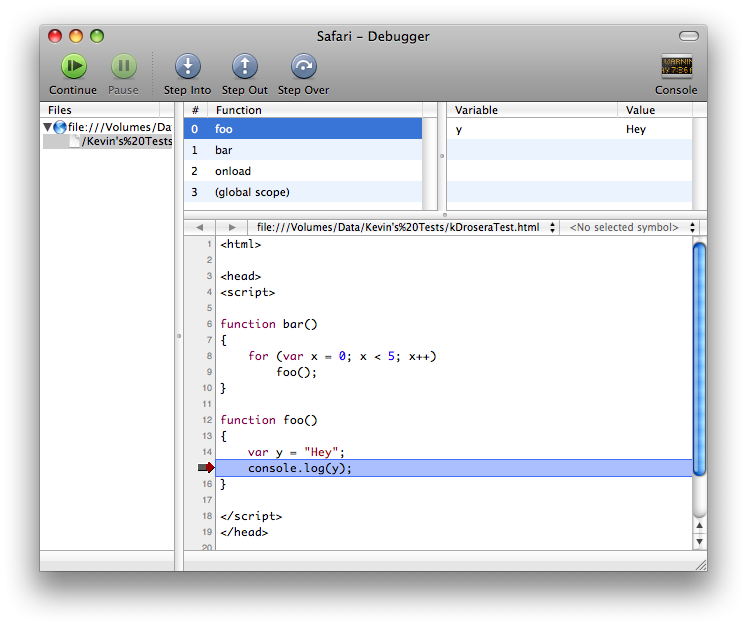
One of the best WebKit improvements is the availability of Web Developer tools, the Web Inspector and the Drosera JavaScript debugger. I can’t really describe these better than the original blog posts, so here’s some screenshots and links to the original posts:

Web Inspector:
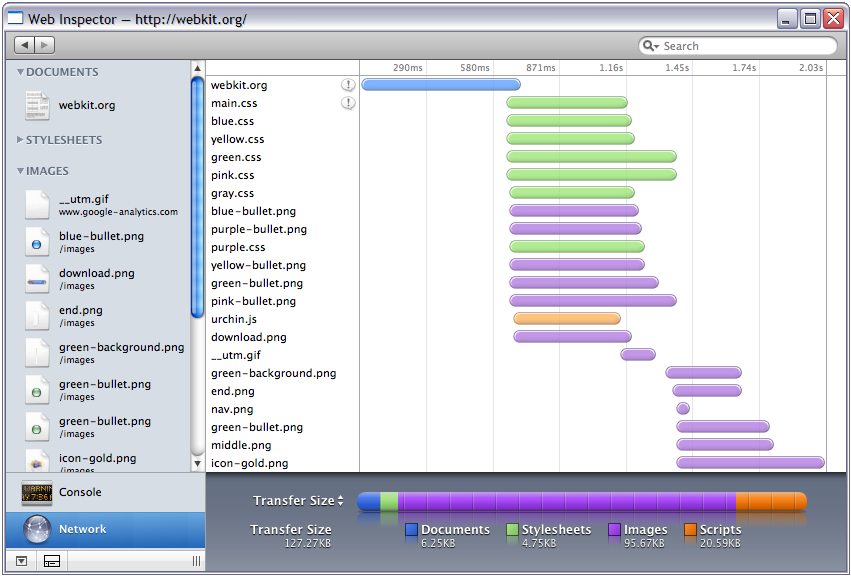

Web Inspector screenshot

Drosera:


Conclusion

So that’s it, ten huge new features in WebKit 3. Grab Mac OS X Leopard, the 10.4.11 update to Mac OS X Tiger, Safari 3.0.4 Beta for Windows, or your favorite other WebKit-based browser to check them out for yourself, along with thousands of smaller features and bug fixes.

54 Responses to “Ten New Things in WebKit 3”

  1. Ross Says:

    I’ve just download 3.0.4 on Windows, but no sign of the Web Inspector – is there something I need to do to enable it? All Google throws up are suggestions to download the nightlies.

  2. Pingback from Michael Tsai - Blog - Ten New Things in WebKit 3:

    [...] Maciej Stachowiak: [...]

  3. Robin Says:

    I believe the developer tools are Mac only.

  4. doekman Says:

    @maciej: the column-demo doesn’t work (you need to specify a dash before webkit-column-count).

  5. macnoid Says:

    In item 8 (Advanced CSS Styling) your demo of multiple column text layout fails (all appears in one wide column) in both the webkit nightly and Safari 3. This is apparently just a bug with this example since the previous post announcing support for this feature works ( “CSS3 Multi-Column Support” http://webkit.org/blog/88/css3-multi-column-support/ ) as do examples on other sites ( “Multi-column layout – CSS3.Info” http://www.css3.info/preview/multi-column-layout/ )

  6. doekman Says:

    (the column feature of webkit works perfectly: http://www.xs4all.nl/~zanstra/prj/columns.html)

  7. Adam Salter Says:

    Do you have to use -webkit-column-count for multi column?
    I mean why not just use column-count… Safari 3 supports it + Firefox, so you’re only targeting browsers that support it anyway…

  8. Robin Says:

    Because the spec isn’t finalised. If the spec changes then you wouldn’t want different behaviours across different browser versions. Once it’s finished the -webkit- and -moz- will come off.

  9. Pingback from Safari 3 for Tiger is Now Out : Kempwire.com:

    [...] are the improvements? Surfin’ Safari has a list of ten new things in Safari 3. The biggest performance improvements in my opinion are the enhanced rich text editing, faster [...]

  10. Fyrd Says:

    So Safari 3 for OS X is considered stable, but the Windows version is still in Beta, is that correct? Any word on when the Windows version will go out of beta?

  11. Andreas Amann Says:

    Much more complete and compatible XMLHttpRequest

    But it seems to have broken cookie handling – instead of the cookie specified by xmlRequest.setrequestheader(”Cookie”,”xxx”) it always sends the cookies from Safar’s cookie storage (both Safari and Dashboard doe so) – this makes it impossible to use multiple independent cookie-based logins into one site and from reading the linked XMLHttpRequest I still believe that this is a bug.

    Filed as rdar://5567386 with testing instructions

  12. Mitz Pettel Says:

    @macnoid:
    Thanks, leading dash added!

  13. José Jeria Says:

    Does WebKit 3 still suffer from the window.onload triggering too fast?
    http://www.howtocreate.co.uk/safaribenchmarks.html

  14. Pingback from Team BKWLD » Ten New Things in WebKit 3:

    [...] J outlines ten cool new features in the latest Safari release. This is the version of Safari that ships with Leopard, and is included with the Tiger 10.4.11 [...]

  15. Oliver Says:

    @José: “Some have argued that page loading benchmarks are unfair because browsers dispatch the load before painting, and Safari will sometimes even do it before the first layout. But the HTML i-Bench is one of the few tests to factor this out — …”

    The fact of the matter is that this is not a bug, and is in fact a legitimate performance improvement in a number of real world web sites. The details at http://www.howtocreate.co.uk/safaribenchmarks.html are wrong in that they believe there is a specifically defined moment that onload should be fired. Not only is this not true in theory, it is also not true in practise. Any benchmark that relies solely on an onload handler *will* be wrong as all of the major browsers vary to some extent wrt to when they fire onload.

  16. Pingback from ReneRitchie.net » WebKit’ed - 10 New Features in 3.0:

    [...] Surfin’ Safari – Blog Archive » Ten New Things in WebKit 3 Apple’s site can tell you a lot about the new end-user features of Safari 3. But a lot of the goodness is on the inside, in the WebKit engine that powers Safari. Here’s a list of ten of the most exciting engine enhancements since the Safari 2 version of WebKit, with lots of details and demos. These features are all included in the WebKit that comes with Safari 3 – you don’t have to download nightlies or anything else to get them. November 15, 2007 – Apple – [...]

  17. Pingback from EurApple » Blog Archive » Webkit 3 rises up to the challenge:

    [...] that Safari Beta for Windows includes this gem, maybe the Windows version can start to show up in the radar. We know how difficult has been to [...]

  18. Miles Says:

    So are these the last new features we will see in Safari 3? What about DOM or CSS bugs? It seemed to me that Safari 2 languished with several DOM bugs well over a year after they were fixed in WebKit.

    If portions of the CSS3 spec are finalized, will Safari 3 be updated to support those properties without the -webkit prefix, or will those changes only be made in WebKit and released with Safari 4 a few more years down the line?

  19. Pingback from feed me apple snacks » Q: What’s Cool about Safari?:

    [...] most Safari users will be on the Webkit 3 platform.  To celebrate, Ars points us to the Surfin’ Safari Weblog’s top 10 new things in WebKit 3 (the open source basis for Safari).  They basically boil down to [...]

  20. Pingback from Runtime wars (2): Apple’s answer to Flash, Silverlight and JavaFX « counternotions:

    [...] Apple’s Trojan horse in multi-platform, multimedia runtime is a piece of open source technology that’s already on Windows, Mac OS X, Linux, Adobe Flex/AIR, iPhone, iPod touch, Nokia S60 smartphones and Google’s new Android/Open Handset Alliance, with 30+ partners around the globe: WebKit 3.0. [...]

  21. Pingback from links for 2007-11-16 « Mandarine:

    [...] Ten New Things in WebKit 3 These features are all included in the WebKit that comes with Safari 3. (tags: browser css osx safari webdev apple opensource svg) [...]

  22. Pingback from warpedvisions.org » Blog Archive » Webkit 3.10 features:

    [...] 15th, 2007 in Links A top10 list of Webkit 3.10 features. It will be very cool when webkit is usable in a native Gnome [...]

  23. Pingback from Webkit 3.0 mejora Safari ::

    [...] Ahora que se ha lanzado la nueva versión de Safari Beta para Windows, junto a una actualización para Tiger, todas las versiones del popular navegador cuentan con la misma versión del componente principal: Webkit 3.0. Este nuevo componente introduce una serie de cambios que lo traen a la par de su comptencia, y cabe resaltar que sin duda esta nueva versión constituye uno de los cambios más importantes, tanto para Windows como para el OS X. Los programadores de Webkit ahora quieren resaltar las 10 mejores funciones que esta nuueva versión introduce: [...]

  24. Pingback from Ajaxian » WebKit 3 shows up with the new Safari:

    [...] To kick this off, Maciej Stachowiak has blogged 10 new things in WebKit 3: [...]

  25. Pingback from links for 2007-11-16 | Lazycoder:

    [...] Ten New Things in WebKit 3 (tags: Programming Tech lazycoder safari webdevelopment) [...]

  26. Pingback from Playing With Safari 3 :: Col’s Tech Stuff:

    [...] It starts up quickly and runs quickly too, even with tons of open tabs. Of all the enhancements detailed, the ones I like the most [...]

  27. stovak Says:

    Does anyone know… is there a way in the web inspector to see get and post variables and returned ajax the way firebug works?

    -tom

  28. Pingback from Javascript News » Blog Archive » WebKit 3 shows up with the new Safari:

    [...] To kick this off, Maciej Stachowiak has blogged 10 new things in WebKit 3: [...]

  29. Pingback from Der Safari Web Inspector : agenturblog.de:

    [...] Details zur aktuellen Version von Safari 3 und dem Webkit 3 gibt es bei Surfin Safari, gefunden bei 512MB und Michael [...]

  30. Pingback from Apple Blog » Blog Archive » Ten things to love about WebKit 3:

    [...] Lists, top ten lists in particular, are prime Digg bait. I have to imagine that might have been a motivating factor for the WebKit team to summarize ten great things about WebKit 3 in a blog posting. [...]

  31. lookfirst Says:

    As a web developer who spends all day in a browser, the thing that would make me stop using Firefox entirely is if there was a port of Firebug, Tamper Data and the WebDeveloper extensions to Safari. Without those tools, it does not matter how good it is, Safari loses entirely.

  32. adamv Says:

    From some reason, I can’t seem to Find Drosera. I’m running Leopard and I just updated to 10.5.1 but I can’t find Drosera anywhere. The linked to entry talks about having to install the nightly but that hardly seems like its included.

  33. lucsky Says:

    @ adamv: I can’t find it either, the only place I was able to find it was the nightly build. BUT the Drosera which comes with the nightly build only seems to work with the nightly build itself, not the system default Safari, which is, erm, quite stupid.

  34. Christopher Says:

    I don’t know if its WebKit or WordPress, but the RTF features were not completely working when editing my blog the other day. In particular, hard returns did not actually create new paragraphs when I published — it would look like I did when I was in the editor, but once I went to the site — they didn’t stay there. I had to go to Firefox and ad the hard returns there. Just FYI.

  35. Pingback from Safari 3 and Wordpress still don’t want to play nicely together. « GracefulFlavor:

    [...] my Mac. I like it well enough, but the vast improvements in Safari under Leopard (specifically the improvements made to WebKit) have made me try to make the switch to Safari [...]

  36. ht Says:

    Wonderful to see the new support for rich text editing. Safari’s an exciting place to be.

    But Christopher is right. There seems to be a bug in Safari when it comes to WordPress and its rich text editor (TinyMCE?). Safari seems to concatenate paragraphs. They appear to be OK in the editing window, but when a page is saved all the paragraphs are rolled into one long one.

  37. Mark Rowe Says:

    Please make sure to file a bug report if you notice any problems. http://webkit.org/quality/reporting.html has instructions on how to go about this.

  38. aljoscha Says:

    @lucsky: Drosera (from the nightly builts) works well with Safari 3.0.4. (and other shipping Webkit Apps like Coda for that matter)
    Just Start Safari and then Drosera and attach it.

  39. lucsky Says:

    @aljoscha: I gave it another try and you are right, it does work with the default Safari 3.0.4. However, Drosera does require WebKit.app to be present on the disk, otherwise it won’t lauch and will give the following error message: “Drosera nightly builds require WebKit.app to run. Please check that it is available and then try again”, which is why I was incorrectly thinking that it was only working with the nightly build. Sorry about the noise.

  40. ianji Says:

    I recently updated to Mac OS X 10.4.11 and got my first look at Safari 3. Nice improvements all round but my favorite was “Proper support for named character references in XHTML”. At least I assume that is what fixed a nasty bug in Safari 2.

    Previously, when you had a link on an XHTML page pointing to a URL containing “&” it didn’t work when you clicked on the link in Safari because it translated it to a strange numerical code which was not understood by the server. Such pages were valid XHTML according to W3C and worked fine in Firefox but not Safari. Now all is well.

    I tried submitting a similar comment a few days ago but it didn’t appear – will it work this time?

  41. ianji Says:

    My second attempt at posting a comment worked, but I just need to clarify something. The links I was talking about did actually contain a properly encoded ampersand (bare ampersands are not allowed in XHTML). In my comment I tried to make it clear that the link contained the character reference ampersand amp semicolon but (assuming I didn’t just forget to do so) it looks like wordpress has interpreted that and rendered it as just an ampersand. Hope that makes sense!

  42. Mark Rowe Says:

    @ianji: I tweaked your first comment to show what you intended it to.

  43. Pingback from MACNOTES.DE » Webkit 3: Was ist neu:

    [...] Das Webkit-Team hat jetzt in einem Blog-Eintrag die aus ihrer Sicht 10 wichtigsten Verbesserungen vorgestellt. Webkit ist der Unterbau von Safari und ist in Mac OS X für die Darstellung von HTML- und [...]

  44. girliemac Says:

    Hi!
    I am excited about these new features on Safari 3!
    I wonder if you have any plan to add an iPhone (and iPod) user-agent to the User-Agent switching menu as a part of dev tool.
    Currently, I use Firefox to “fake” UA for development, but I really would like to use Safari as my primary dev tool :-)
    Thanks!

  45. Danny Bloemendaal Says:

    I agree completely with lookfirst. For me Safari is just a browser that I open every now and then to see if my pages work. But as long as there is no firebug equivalent for Safari, I am not going to use it as my main browser. I absolutely need Firebug for my work and what you guys have come up with so far doesn’t even come close to be useful to me. And I know a lot of people who think about it the same. So if you ask me, if you really want to gain momentum in the browser world.. stop developing new css3 features and focus on these development tools.

    Just my 2 cents :)

  46. RichB Says:

    The latest Safari3/Windows hangs on Win2K3/64bit. Previous betas worked fine. I’m not sure whether it’s the 64bit-ness or the Win2K3-ness that’s causing the problem.

  47. DJCarbon43 Says:

    @RichB:

    Safari 3 is not listed as supporting 2k3 as far as I can tell by looking through webkit.org and http://www.apple.com/safari/download/. While it may have run, it has only been designed to support XP/Vista to my knowledge.

    Sorry ;)

  48. b.rvt Says:

    Upgrading from Mac OS X.4.10 to Mac OS X.4.11 completely destroyed Safari in the process. Safari does launch, but does not display any web page. Creating and new user and testing with this user does not help.

  49. Mark Rowe Says:

    @b.rvt: This isn’t really the right place to get support for Safari. My suggestion would be to ensure you have no Safari extensions installed, and double-check that the Safari version matches the WebKit version..

  50. b.rvt Says:

    Visiting the Mac Fixit forum helped me find a workaround. I had PicLens installed (in /Library/Input Managers). Trashing PicLens solved the issue.

    See http://www.macfixitforums.com/showflat.php?Cat=&Board=tiger&Number=838901&page=0&view=collapsed&sb=5&o=31&fpart=1

  51. Pingback from Alp Toker » Blog Archive » WebKit/GTK+ API design:

    [...] is nothing much worth keeping from the GtkHTML API as far as I can tell. WebKit now has excellent editable content support and exposes necessary public API for basic editing. Complex modifications will soon be possible [...]

  52. Pingback from Surfin’ Safari - Blog Archive » Web Inspector Update:

    [...] Maciej said, web developer tools are a big new feature of WebKit 3. Since we first introduced the new Web [...]

  53. Logan Says:

    Please check out this link for how to activate the Web Inspector on the Windows version of Safari 3:

    http://www.typolight.org/forum/viewtopic.php?pid=18408#p18408

  54. defender Says:

    Can technologies like DOM and SVG be used as APIs for a Desktop operating system (read OS X), or are they only standards appropriate for a Web browser?

    WebKit seems to be getting so powerful that it is a shame that some of its technologies don’t make it into OS X itself.

    There is a debate going on inside Apple about a resolution independent GUI. Instead of reinventing the wheel — and forcing programmers to learn yet another proprietary API — why doesn’t Apple just use the ever-powerful, standards-compliant, time-tested SVG instead?